Daily site reports, drafted from your crew’s job notes. You check it before it is filed.
Axentra Data sets up an AI office helper around your own daily report form. Your crew sends job notes through the day the way they do now. The helper drafts the daily construction report for you to check.
How a day of texts becomes a site report.
Your crew texts through the day.
Who is on site, what got done, deliveries, delays and the weather go in the group chat they already use.
The helper drafts the report.
At the end of the day it fills in your own daily report form from those job notes. If something is missing, like an end time, it flags it instead of guessing.
You check it before it is filed.
You fix anything that looks off, then you file it or send it to your client yourself. Nothing goes out until you do.
Sam’s phone · Owner
Today 7:02 AM
On site at 2411 at 7. Me, Kyle and Tom. Cold, light wind.
11:40 AM
Fill delivery came 2 h late. Dozer sat until it showed up.
4:35 PM
Trench is at 60 m. Backfill tomorrow. Kyle and I off at 4:30.
Thanks Ben. Tom, what time did you leave site today? It goes on the daily report.
Company:Halcrest Earthworks Ltd.
DAILY SITE REPORTForm DSR-01 · Rev. 2026-10DRAFT
Crew on site
| Name | Start | End |
|---|---|---|
| Ben | 7:00 | 4:30 |
| Kyle | 7:00 | 4:30 |
| Tom | 7:00 | End time? |
Work done today
Trench dug to 60 m.
Deliveries
Fill delivery, arrived 2 h late.
Delays and causes
Dozer on standby 2 h, waiting on fill.
Safety notes
Nothing reported in the crew chat.
Plan for tomorrow
Backfill the trench.
Site supervisor (signature)Waiting on Sam’s check
Date
Draft by your office helperPage 1 of 1
Flagged for youTom’s end time is missing. The helper asked him in the crew chat.
What goes in a daily construction report.
Every contractor’s daily log looks a little different, but most daily site reports cover the same ground. Your helper fills in each part from what the crew sent that day.
- Date, job number and site
- Who was on site and their hours
- Equipment on the job
- Work done today
- Deliveries and materials
- Delays and what caused them
- Weather
- Safety notes and anything that needs follow-up
- Visitors and inspections
- The plan for tomorrow
Already have a daily report form? Keep it. We build the helper around your form, not ours.
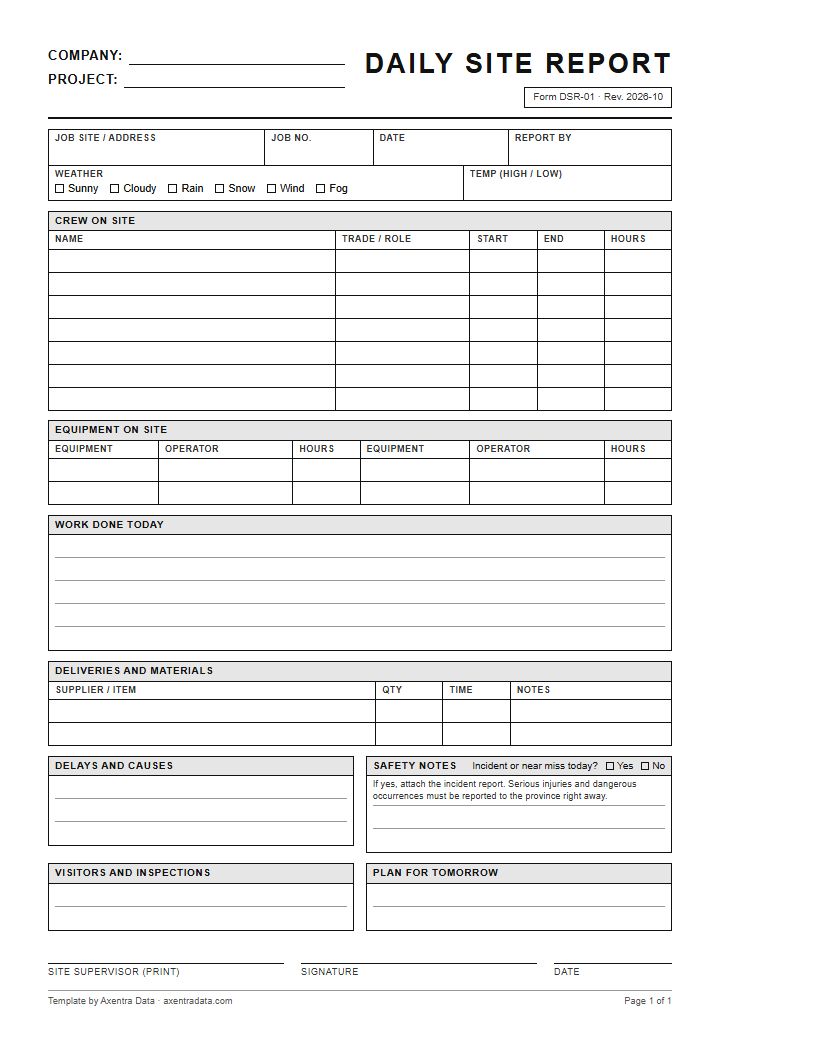
Free template
Free daily site report template.
A blank, one-page daily construction report. Print a stack for the truck, or use it as a starting point for your own form. No sign-up, no email needed.
- Letter size PDF, one page
- Job site, job number, date, weather and temperature
- Crew on site with start, end and hours, plus equipment and operators
- Work done, deliveries, delays, safety notes, visitors and the plan for tomorrow
- Site supervisor sign-off and date
Rather have it filled in for you from your crew’s texts? Book a free consultation.
Why contractors hand off the first draft.
Written the same day.
The report is drafted from what the crew sent today, not pieced together from memory at the end of the week.
A record you can find.
When a client asks about a delay weeks later, the daily report shows what happened on site that day.
One set of job notes.
The same texts that fill in the daily report also feed your timesheets and invoices, so the crew sends them once.
Questions people ask
Straight answers.
What is a daily site report?
A daily site report is a short record of what happened on a job that day. It usually lists the crew, the work done, deliveries, delays, the weather and anything that needs follow-up. Some contractors call it a daily construction report or a daily log.
Can it use my own daily report form?
Yes, it fills in the daily report form you already use. Bring your form to the free consultation and we build the helper around it.
Does it send the report to my client?
No, nothing goes out until you check it. The helper drafts the report. You fix anything, then you file it or send it yourself.
What if the crew forgets to mention something?
The helper flags the gap instead of guessing. You or your crew lead fill it in before the report is filed.
Does my crew need a new app?
No, your crew keeps sending job notes the way they do now. We go through your setup with you before anything starts.
Is there a free daily site report template?
Yes, you can download a blank daily site report template on this page. It is a one-page, letter-size PDF with crew, equipment, work done, delays, safety notes and a sign-off. Print it, or use it as a starting point for your own form.
What does it cost?
A monthly subscription starts as low as $25 a month for a team of 1 to 10, depending on use. For our first clients, some simple builds are $0 up front. Bigger builds are quoted before we start. There are no per-user fees.
Still writing up the day after dark?
Show us your daily report form and what your crew sends you. The first chat is free.