Timesheets from your crew's texts. You approve them before payroll.
Your crew already texts their hours. Your AI office helper turns those messages into a draft timesheet on your own form. You check it, fix anything, and approve it. Entries go to payroll only after you do.
1 The crew texts the hours
Ben's phone
2 The helper fills in your timesheet
Company: Halcrest Earthworks Ltd.
Daily Crew Timesheet
Hours worked
| Name | Trade | Start | End | Break | Hours |
|---|---|---|---|---|---|
| Ben | Foreman | 7:00 | 3:30 | 0:30 | 8.0 |
| Sam | Labourer | 7:00 | 3:30 | 0:30 | 8.0 |
| Kyle | Operator | 7:00 | 3:30 | 0:30 | 8.0 |
| Tom | Labourer | 10:00 | 4:00 | 0:30 | 5.5 |
| Total | 29.5 | ||||
* Tom's end time from his reply, 3:41 PM.
On your own timesheet form. The approval line stays empty until you sign off.
3 You approve it, then payroll
Dana's phone · Owner
How it works
Three steps. The last one is yours.
-
Your crew sends hours the way they do now
Start and end times, the job, who was on site. A text in the crew group chat is enough. Nobody learns a new app or a new login.
-
The helper drafts the timesheet
It puts each person's hours on your own timesheet form, against the right job. If an end time or a name is missing, it asks or flags it for you instead of guessing.
-
You approve it, then it goes to payroll
You read the draft, change what needs changing, and approve it. Only then do the entries go on to payroll. The helper never starts a payment.
What stays the same
Your form. Your rules. Your sign-off.
Your own timesheet
We build the helper around the timesheet you already use, in the tools you already use. Your office keeps working the way it does.
Reported hours only
Only the hours your crew reports go on the timesheet. Planned hours from a schedule are never filled in as hours worked.
Gaps get flagged
A missing number is marked on the draft so you can see it. You or your crew lead fill it in before anything moves.
Nothing moves on its own
The timesheet stays a draft until you approve it. You decide when the entries go to payroll.
Timesheets are one job for the helper. Because we build it around your own forms, the same job notes can also become your invoices, safety briefings, daily site reports and a wide range of other paperwork your office types up today. We set it up with you, on site anywhere in Saskatchewan or remotely elsewhere.
Free template
Still on paper? Start with ours.
Our weekly timesheet is free to download and print. It has a row for each job, start and end times, when meal breaks start and end, regular and overtime hours, and lines for the employee and the supervisor to sign before payroll.
-
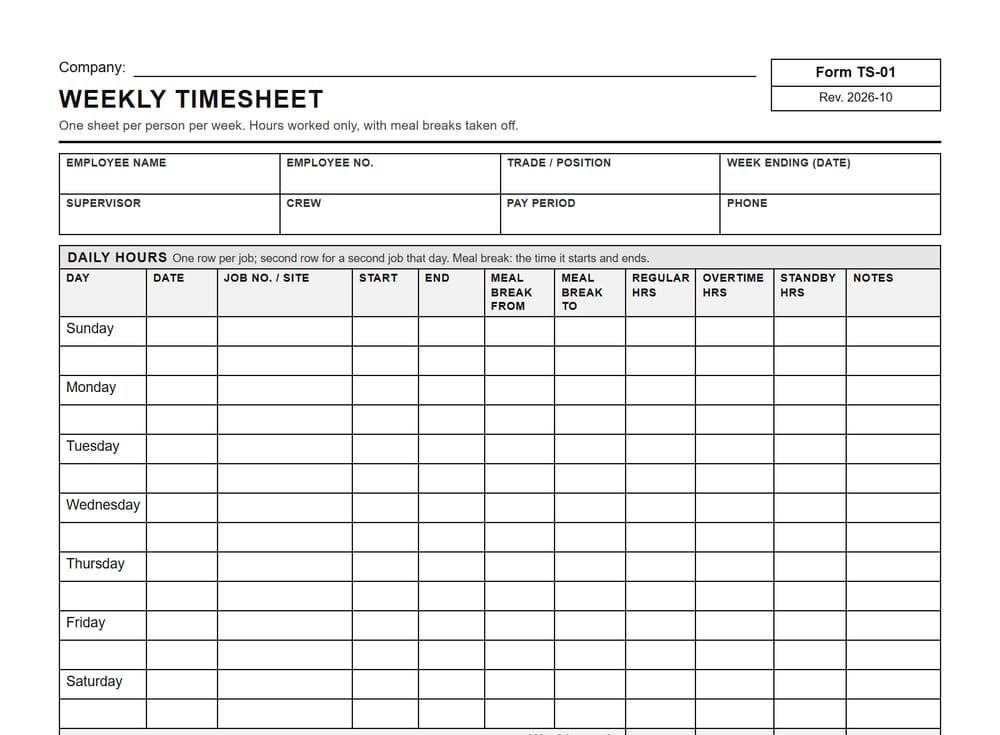
Weekly timesheet
One sheet per person per week, with a row for each job, start and end times, meal break times, regular, overtime and standby hours.
When: Through the week, then signed by the employee and approved by a supervisor before payroll.
On the sheet: Daily rows with job, start, end, meal break from and to, and hours, weekly totals, time off, employee and supervisor sign-off.
Download the weekly timesheet template
More free forms, like a toolbox talk and a field level hazard assessment, are on our free safety form templates page.
Questions people ask
Straight answers.
How does it make a timesheet from job notes?
It reads the hours your crew already sends and puts them on your own timesheet form as a draft. Each line keeps the person, the job and the hours from their message. You check the draft and fix anything before you approve it.
Does it send hours to payroll on its own?
No. Entries go to payroll only after you approve them. Until then the timesheet is a draft that only you see, and no payment is ever started by the helper.
What if someone forgets to send their hours?
The helper flags the gap instead of guessing. You or your crew lead fill it in, then you check the timesheet before you approve it.
Do planned hours count as hours worked?
No. Only the hours your crew reports go on the timesheet. Planned hours from a schedule are never filled in as hours worked.
Does my crew need a new app?
No. Your crew keeps sending job notes the way they do now, in the chat app they already use. We go through your setup with you before anything starts.
Is there a free timesheet template?
Yes. Our weekly timesheet template is a free, letter-size PDF you can download and print. It has daily rows for the job, start, end, meal break times and hours, weekly totals, and lines for the employee and the supervisor to sign before payroll.
What does it cost?
For our first clients, some simple builds are $0 up front. Bigger builds are quoted before we start. Then a monthly subscription, as low as $25 a month for a team of 1 to 10, with actual use affecting cost. We explain it before you start.
Still typing up hours every Friday?
Show us how your crew sends hours now and the timesheet they end up on. The first chat is free.