Contractor invoices, drafted from your crew’s job notes. You check it, then send it.
Axentra Data sets up an AI office helper around your own invoice form. Your crew sends job notes the way they do now. The helper turns them into a draft invoice for you to check and send.
How a job note becomes an invoice.
Your crew sends the day.
Hours, equipment, loads and extra work go in the group chat they already use. Nobody learns a new app.
The helper drafts the invoice.
It fills in your own invoice form: the client, the job number, each line and the totals. If an hour or a rate is missing, it flags it instead of guessing.
You check it and send it.
You fix anything that looks off, then you send it the way you always do. The helper never sends an invoice and never starts a payment.
Sam’s phone · Owner
Today 4:52 PM
Job 2411 done for today. Me on the excavator 8 h, Tom on the dozer 6 h.
Hauled 4 loads of fill to 2411
Got it. The invoice for Job 2411 is drafted for Sam to check.
Company:Halcrest Earthworks Ltd.
INVOICEForm INV-01 · Rev. 2026-10DRAFT
Attn: Accounts Payable
Saskatoon, SK
| Description | Qty | Unit | Rate | Amount |
|---|---|---|---|---|
| Excavator, operator Kyle | 8 | hr | 200.00 | 1,600.00 |
| Dozer, operator Tom | 6 | hr | 180.00 | 1,080.00 |
| Fill, hauled by Ben | 4 | load | Rate? |
| Subtotal | Waiting on 1 rate |
|---|---|
| Tax | Waiting on 1 rate |
| Total due | Waiting on 1 rate |
Approved by (signature)Waiting on Sam’s check
Date
Draft by your office helperPage 1 of 1
Flagged for youNo fill rate for this client yet. Which rate should I use?
What goes on a construction invoice.
Whether you start from a construction invoice template or a form you have used for years, most invoices carry the same parts. Your helper fills in each one from the job notes.
- Your business name and contact details
- Invoice number and date
- Your client’s name and billing address
- Job number, site or PO number
- Labour: who worked, the hours and the rate
- Equipment and trucks: hours or loads and the rate
- Materials and extra work, like a change order
- Subtotal, taxes and the total due
- Payment terms, like Net 30
Already have a template you like? Keep it. We build the helper around your form, not ours.
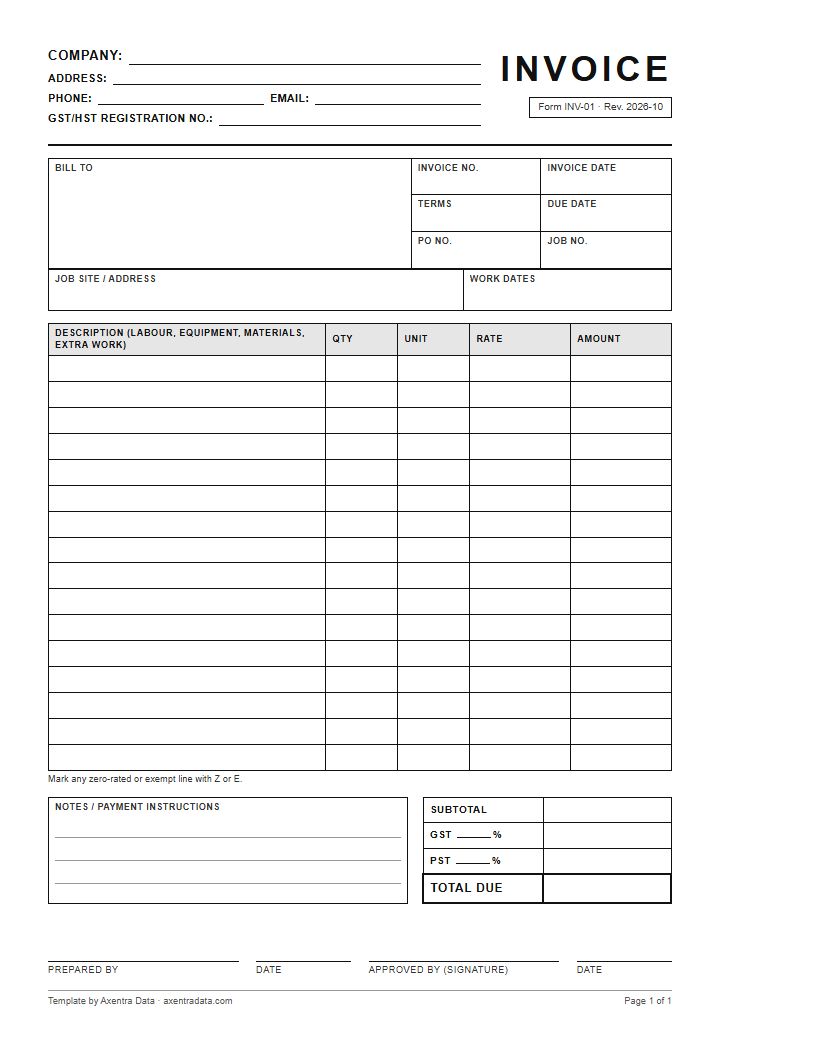
Free template
Free construction invoice template.
A blank, one-page contractor invoice. Print it and fill it in by hand, or use it as a starting point for your own form. No sign-up, no email needed.
- Letter size PDF, one page
- Bill to, job site, invoice number, date, terms, PO and job number
- Line items with qty, unit, rate and amount, then subtotal, GST and PST lines and total due
- Notes, prepared by and approved by lines
Rather have it filled in for you from your crew’s texts? Book a free consultation.
Why contractors hand off the first draft.
No typing it twice.
The crew already wrote down the hours and the loads. The helper copies them onto the invoice, so you are not retyping texts at night.
Extra work shows up.
When the crew mentions extra work, it lands on the draft as its own line. You decide what to bill before it goes out.
Same numbers everywhere.
The hours on the invoice come from the same job notes as the crew’s timesheet, so the two line up when you check them.
Questions people ask
Straight answers.
Does the helper send invoices to my clients?
No, you send every invoice yourself. The helper drafts it on your form. You check it, fix anything, then send it. It never starts a payment.
Can it use my own invoice template?
Yes, it fills in the invoice form you already use. Bring your template to the free consultation and we build the helper around it.
What if the crew leaves out an hour or a rate?
The helper flags the missing number instead of guessing. You or your crew lead fill it in, then you check the total.
Does it do the math on invoices?
Yes, the draft adds up the lines and the totals the way your own invoices do. You check the totals before it goes to your client.
Does my crew need a new app?
No, your crew keeps sending job notes the way they do now. We go through your setup with you before anything starts.
Is there a free construction invoice template?
Yes, you can download a blank contractor invoice template on this page. It is a one-page, letter-size PDF with line items, totals and sign-off lines. Print it, or use it as a starting point for your own form.
What does it cost?
A monthly subscription starts as low as $25 a month for a team of 1 to 10, depending on use. For our first clients, some simple builds are $0 up front. Bigger builds are quoted before we start. There are no per-user fees.
Tired of typing invoices from texts?
Show us your invoice form and what your crew sends you. The first chat is free.